This release delivers focused enhancements across all agents—including Account, Catalog, Inventory, Order, Price, Review, Loyalty, CSR, and Promotions—boosting efficiency, data accuracy, and workflow performance.
Introducing Equinox Personified Agents
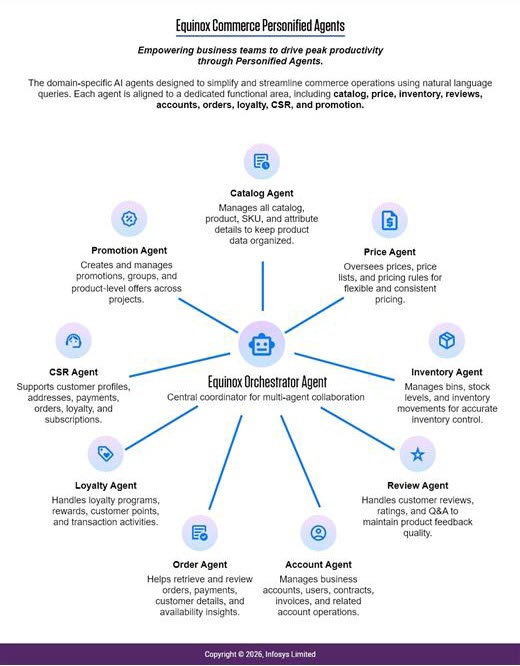
Equinox now introduces Personified Agents—domain‑specific AI agents designed to simplify and streamline commerce operations using natural language queries.
Each agent is aligned to a dedicated functional area, including catalog, price, inventory, reviews, accounts, orders, loyalty, CSR, and promotions.
By translating complex, API‑driven backend actions into natural, conversational interactions, Personified Agents enable business users and client teams to perform tasks quickly, accurately, and with minimal operational overhead.
Account Agent
- Account Management – Helps you easily view, create, and update business accounts by giving quick access to account details, buyer information, and essential profile data. It supports everyday tasks like searching accounts and keeping their information accurate and up to date.
- User Management – Makes it simple to manage the users linked to each account. You can view buyer users, search for specific profiles, and validate user information to ensure account teams are set up correctly.
- Contract Management – Allows you to create, view, and update contracts for each account, including key details like terms, pricing, and associated documents. It helps keep contract information organized and easy to retrieve when needed.
- Invoice Management – Helps you manage invoices by viewing invoice lists, accessing detailed billing information, creating new invoices from orders, and updating payment status. It also supports sending invoice notifications to buyers.
- Order Management – Gives you quick access to all orders associated with an account, with options to filter and search so you can find specific order details easily.
- Configuration Management – Lets you manage custom fields and attributes for accounts, helping you tailor account information to your specific business needs.
Catalog Agent
- Catalog Operations – Helps you manage all your catalogs by allowing you to view, create, and update catalog structures, ensuring your catalog hierarchy stays clear, organized, and aligned with business needs.
- Product Management – Makes it easy to maintain product information by supporting the addition of new products, updating existing details, and reviewing product data to ensure accuracy across the catalog.
- SKU Management – Allows you to efficiently handle SKUs by creating new ones, updating their information, and accessing SKU‑level details, helping keep product variations consistent and well‑structured.
- Attribute Management – Enables you to define, update, and review product attributes so your catalog remains searchable, well‑categorized, and easier for shoppers to navigate.
- Project Management – Supports catalog‑related initiatives by helping you create and update projects, track their progress, and organize catalog changes within structured workflows.
- Model Management – Provides tools to manage models and their values, ensuring product content follows a consistent structure and supports richer product information across the catalog.
Inventory Agent
- Inventory Bin Management – Helps you organize and maintain your inventory storage structure by allowing you to view, create, and update bins, including managing how bins relate to each other within a hierarchy for managing parent- child bin relationship.
- Bin Item Management – Supports day‑to‑day stock handling by letting you review items stored in bins, adjust stock levels, manage thresholds, and map products to the right bin locations, ensuring accurate visibility of available inventory.
- Transaction Management – Provides a clear view of all inventory movements while allowing you to record new additions, removals, or transfers, making it easy to track and understand every change in your inventory over time.
- Inventory Rules – Enables you to define and update rules that guide how inventory is managed, helping automate key processes and maintain consistency across your warehouse operations.
Order Agent
- Order Retrieval & Search – Helps you quickly find orders by allowing you to browse all orders, search using different criteria, or view specific order details and summaries, making it easy to track customer activity.
- Payment Information – Provides clear access to payment details for each order, including payment methods and transaction information, helping you verify and manage billing‑related inquiries.
- Customer Management – Supports customer‑related tasks such as linking guest orders to registered users, checking user details, and validating customer accounts to maintain accurate order records.
- Inventory & Products – Allows you to check product availability and view inventory levels for SKUs directly from the order context, ensuring you have the information needed to answer availability questions.
- Analytics & Reporting – Gives you visibility into overall sales activity with access to order counts, return statistics, and summary insights, helping you monitor order performance over time.
Price Agent
- Price Management – Helps you easily set and update product prices, whether you’re adjusting a single SKU or making changes in bulk. It supports different pricing needs like tiered pricing, regional prices, subscription prices, and scheduled price updates to keep your pricing flexible and consistent.
- Price Lists & Projects – Makes it simple to organize your pricing work by creating dedicated price lists and projects. This helps you manage different pricing setups, currencies, and configurations in a clean and structured way.
- Price Facets & Rules – Lets you create and manage pricing dimensions and rules that shape how prices are calculated. This ensures your pricing adapts smoothly to different customer groups, locations, or business conditions.
- Price Analysis & Retrieval – Gives you an easy way to look up price information, check pricing history, retrieve price information for any SKU, and filter through data so you can quickly find the details you need for decision‑making.
Review Agent
- Reviews & Ratings Management – Helps you easily view, update, and manage customer reviews by providing clear access to review lists, individual review details, and the ability to adjust content, ratings, and review status for better quality control.
- Questions & Answers (Q&A) – Supports managing product‑related questions by allowing you to view existing Q&A, add new questions or answers, update their status, and keep product information helpful and up to date for buyers.
- Ratings Summary – Provides quick access to overall rating insights, giving you a clear summary of customer sentiment and helping you understand product performance at a glance.
Loyalty Agent
- Loyalty Program Management – Helps you set up and manage loyalty programs by creating events, configuring rules for earning or redeeming points, and organizing how different loyalty actions should work within the program.
- Rewards System – Allows you to create and manage various reward types, including points and vouchers. You can control how rewards are earned or redeemed and maintain smooth approval workflows for customer rewards.
- Customer Loyalty Management – Makes it easy to oversee customer loyalty activity by managing reward banks, tracking transactions, and viewing point balances, histories, and tier statuses to support ongoing customer engagement.
- Transactions – Supports day‑to‑day loyalty operations by letting you record and track earning and redemption activities, manage transaction details, and handle expiries or notes tied to customer rewards.
- Configuration & Monitoring – Provides tools to view reward types, filter through loyalty data, and manage store or business associations, ensuring your loyalty program stays organized and aligned with business needs.
CSR Agent
- Customer Management – Helps you easily find, create, and update customer profiles by providing quick access to their details, preferences, and account information, making day‑to‑day customer handling smooth and efficient.
- Address Management – Allows you to view, add, and update customer addresses so you can keep their shipping and billing information accurate and up to date.
- Payment Management – Makes it simple to manage saved payment methods by letting you view, add, or update customer payment details whenever needed.
- Order & Cart Operations – Gives you access to a customer’s order history and shopping cart, helping you assist them with past purchases or items they’re currently interested in.
- Loyalty & Rewards – Supports managing customer loyalty activity by showing points, rewards, and transaction history, and allowing you to add or update loyalty actions when needed.
- Subscription Management – Helps you oversee customer subscriptions by letting you view details, update preferences, process orders, adjust delivery intervals, or cancel subscriptions.
- Custom Attributes – Lets you create and manage custom customer fields to support unique business requirements and maintain richer customer profiles.
- Additional Features – Provides helpful tools like generating act‑on‑behalf links for assisting customers directly and managing business‑level settings when required.
Promotion Agent
- Promotion Management – Helps you create, update, and organize promotions with ease, allowing you to manage campaign details, schedules, and variations while also retrieving or cloning existing promotions whenever needed.
- Promotion Groups – Makes it simple to group related promotions together so you can manage priorities, update group settings, and view all associated promotions in one place.
- Promotion Lists – Allows you to build and update reusable promotion lists that help target specific products or audiences, making it easier to manage promotional setups.
- Product Promotions – Gives you quick access to product‑specific offers by retrieving active promotions and promotional messages for selected products and SKUs.
- Rules & Configuration – Lets you view available templates and configuration details that guide how promotions behave, helping you maintain consistency across your promotional strategy.
- Project Management – Supports working across multiple promotion projects by letting you view associated projects and manage promotions across different environments or initiatives.
Revision History
2026-02-13 | JP – Added Release 8.21.2 MCP release content.